MS Edge and MSEdgeWebView2 Login Failures
Sep 16, 2026
Summary
Changes to Microsoft's MSEdgeWebView2 runtime are causing unexpected user lockouts due to a behavior introduced in versions 153.x and above. This issue has been reported to Microsoft's GitHub here: https://github.com/MicrosoftEdge/WebView2Feedback/issues/5722
This issue has been resolved in MS Edge Preview version 156.
For those unable to update to the preview build, the below steps will walk you through using the JumpCloud Advanced: Windows Registry policy function to deploy the workaround for this issue.
Advanced Customer Registry Policy
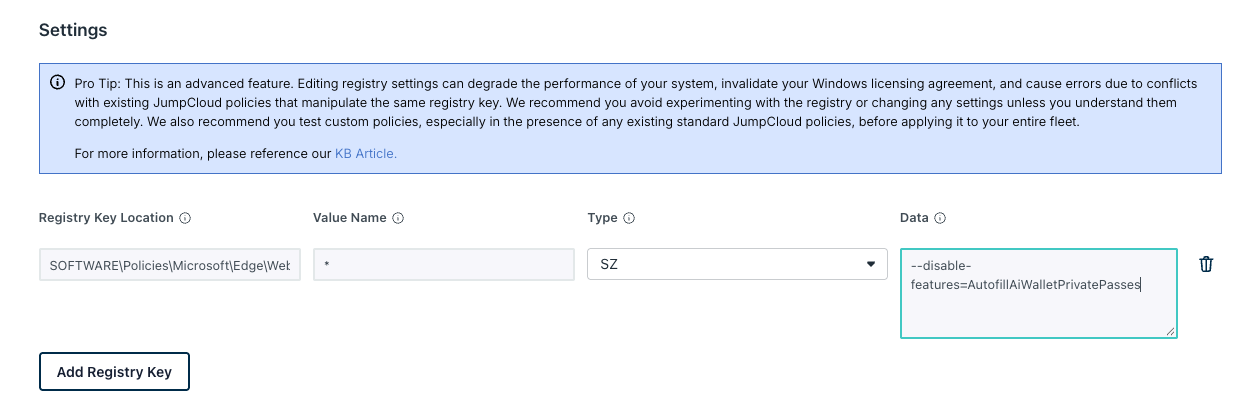
This registry entry should prevent this behavior from occurring. This can be pushed to your devices using the Advanced Custom Registry Policy.
Registry Key Location: HKLM\SOFTWARE\Policies\Microsoft\Edge\WebView2\AdditionalBrowserArguments
Value Name: *
Type: SZ
Data : --disable-features=AutofillAiWalletPrivatePasses
A registry policy is the preferred method: it is continuously enforced, so the value is restored if anything resets it.
- In the JumpCloud Admin Console, go to Device Management > Policy Management.
- Click (+) to create a new Device Policy and select the Windows tab.
- Choose Advanced: Custom Registry Keys.
- Name the policy descriptively, for example
WebView2 - Disable Wallet Autofill. - Under Registry Keys, add one entry per targeted application:
| Field | Value |
|---|---|
| Registry Key Location | SOFTWARE\Policies\Microsoft\Edge\WebView2\AdditionalBrowserArguments |
| Value Name | * |
| Type | String (SZ) |
| Data | --disable-features=AutofillAiWalletPrivatePasses |
- Example:
- Under Device Groups, bind the policy to your pilot group first.
- Save the policy.
Once this key has been successfully deployed your users will need to restart the affected applications. In some cases a system reboot may be necessary for all application processes to fully terminate.
Was this information helpful?