Get Started: Agent Delegated Access
Agent Identities lets you register and manage AI agents as distinct non-human identities. Agent delegated access extends that model so an agent can use its own JumpCloud-managed identity while acting on behalf of an end user.
Prerequisites:
- Private Preview access for Agent Delegated Access enabled for your organization.
- You must have the Administrator with Billing, Administrator, or Manager role to manage agents. See Admin Portal Roles to learn more.
- At least one agent registered under Identity Management > Agents. See Get Started: Agents.
- For user-to-agent delegation, an active OIDC Single Sign-On (SSO) application in your organization that issues user identity tokens (ID tokens) your agents will exchange.
Considerations:
- A new agent acts for nobody until you enable user delegation on its Delegated access tab.
- An agent can act on behalf of all users assigned to the linked OIDC application.
Overview
Agent Delegated Access enables an AI agent to securely act on behalf of a user. It is designed for customer-owned agent runtimes and APIs. Agents exchange a JumpCloud-issued user identity token for a standards-based delegated access token representing both the user and agent. The agent then presents the token to downstream systems (e.g. internal APIs) when fulfilling requests for the user. Downstream systems can tell which agent is acting, who delegated authority, which resource the token is for, and whether the exchange complies with your policy.
Delegated access uses OAuth 2.0 Token Exchange (RFC 8693). An agent authenticates as itself, then exchanges a subject token for a JumpCloud-issued JSON Web Token (JWT) that represents the agent acting on behalf of that subject.
The issued token carries claims that distinguish the acting agent, the delegating subject, the intended audience, and the delegation type. Your APIs validate the signed token directly. Authorization policy rejects unauthorized delegation and audience misuse.
Agents continue to act as themselves for non-delegated flows (for example, client credentials). Delegated access is additive. It does not replace Agent Groups, SSO application assignment, or AI Gateway Model Context Protocol (MCP) connections described in Get Started: Agent Identities.
Overview
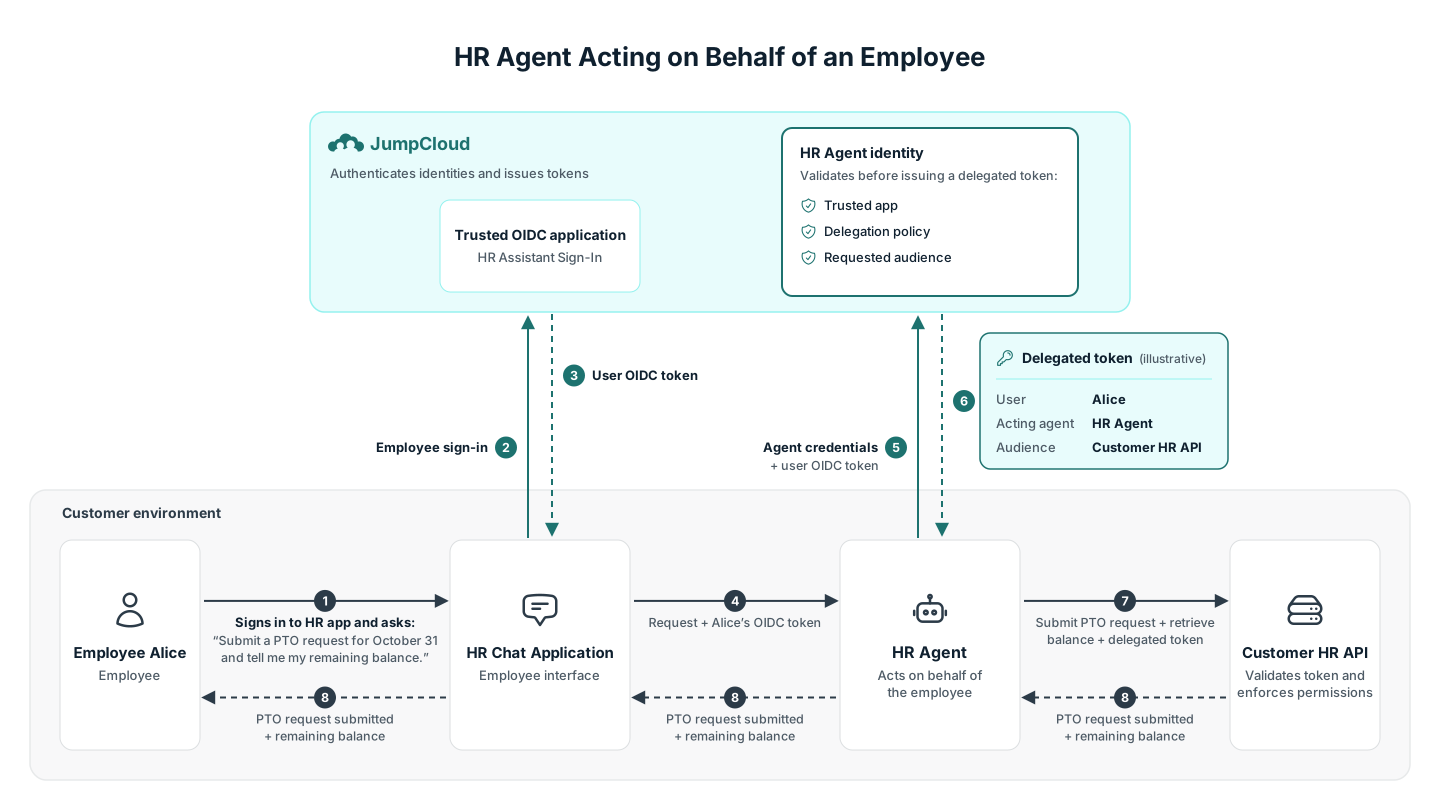
Suppose your organization operates an HR agent with an employee-facing chat web application and an internal HR API. Your developers configure that API to validate JumpCloud-issued delegated tokens and enforce access to HR records.
An employee, Alice, opens the HR chat application and signs in with JumpCloud through the application’s OpenID Connect (OIDC) SSO integration. Alice prompts the HR agent to “Submit a PTO request for October 31 and tell me my remaining balance.” Your integration uses the OIDC token JumpCloud issued during her sign-in and the HR agent’s own credentials to request a delegated token from the JumpCloud authorization service.
The resulting token identifies Alice as the user, the HR agent as the actor, and your internal HR API as the intended resource. The API validates that token and applies your application’s authorization rules to the PTO request and balance lookup. Those rules should allow the agent to perform permitted actions for Alice and reject access to another employee’s records when Alice is not authorized to access them.
The agent can run in a customer-managed runtime such as Amazon Bedrock AgentCore, with JumpCloud providing identity and token exchange and your HR API enforcing application permissions. Configuring delegation does not automatically give the agent all of Alice’s permissions.
Components:
| Component | Role |
|---|---|
| HR Assistant chat application | The employee-facing experience where Alice signs in and asks the HR agent to perform work. Integrated with JumpCloud as an OIDC SSO application. |
| HR Assistant agent identity | The agent’s separate identity and credentials in JumpCloud. It authenticates the agent performing work on Alice’s behalf. Linked to the HR Assistant chat application. |
| Customer-controlled HR API | The service the agent calls to retrieve balances and submit PTO requests. Your organization configures it to validate delegated tokens and enforce application permissions. Its resource identifier is configured as an allowed audience on the agent identity. |
You configure two things for the agent:
- Who it may represent: Users of a trusted JumpCloud OIDC application where users interact with the agent.
- Which resources it may request tokens for: Resource identifiers in the agent’s allowed audience list.
Accessing Agent Delegated Access
- Log in to the JumpCloud Admin Portal.
- Go to Identity Management > Agents.
- Select an agent.
- Click the Delegated access tab.
Reviewing the Delegated Access Tab
The Delegated access tab is where you configure who an agent may act for.
Users
Use the Users section to enable user-to-agent delegation and choose which users the agent may act for.
- Users toggle — Off means the agent may not act for users (
none). On enables user delegation for users assigned to the trusted application. - Trusted OIDC application — Required when Users is on. The picker lists active OIDC applications in your organization (custom and catalog). The UI supports one trusted application per agent. Only ID tokens from that application are accepted for user-to-agent exchange.
- Turning Users off after it was saved opens a confirmation dialog. Confirming clears user delegation and the trusted application.
Reviewing Allowed Audiences on the Authentication Tab
When an agent requests a token (including during token exchange), it can name the intended resource as an audience. JumpCloud validates each requested audience against the agent’s allowed audiences list and sets the token’s aud claim to the approved values.
On the agent’s Authentication tab, under Advanced Settings, you can manage the agent’s allowed audiences:
- Add up to five
httpsaudience values. - Values are stored exactly as entered. Letter case and a trailing
/are significant. - If no audience is requested, the token will not return any audience value.
- Audience values must not use a
jumpcloud.comhost (or subdomain), query, fragment, or whitespace.
Was this information helpful?