Configure OpenVPN to Use Cloud LDAP
You can configure OpenVPN to use JumpCloud's LDAP-as-a-Service, which will perform user authentication and authorization. OpenVPN is an open source connection protocol that facilitates a secure tunnel between two points in a network. It's a trusted technology used by many virtual private networks (VPNs), to ensure that data sent over the internet is encrypted and private.
Prerequisites:
- See Use Cloud LDAP to obtain the JumpCloud specific settings required below.
Version Details:
- Configuration options were qualified using the OpenVPN Virtual Appliance v 2.6.1 via the included Admin UI and the OpenVPN documentation for configuring LDAP authentication.
Configuring OpenVPN for LDAP Authentication and Authorization
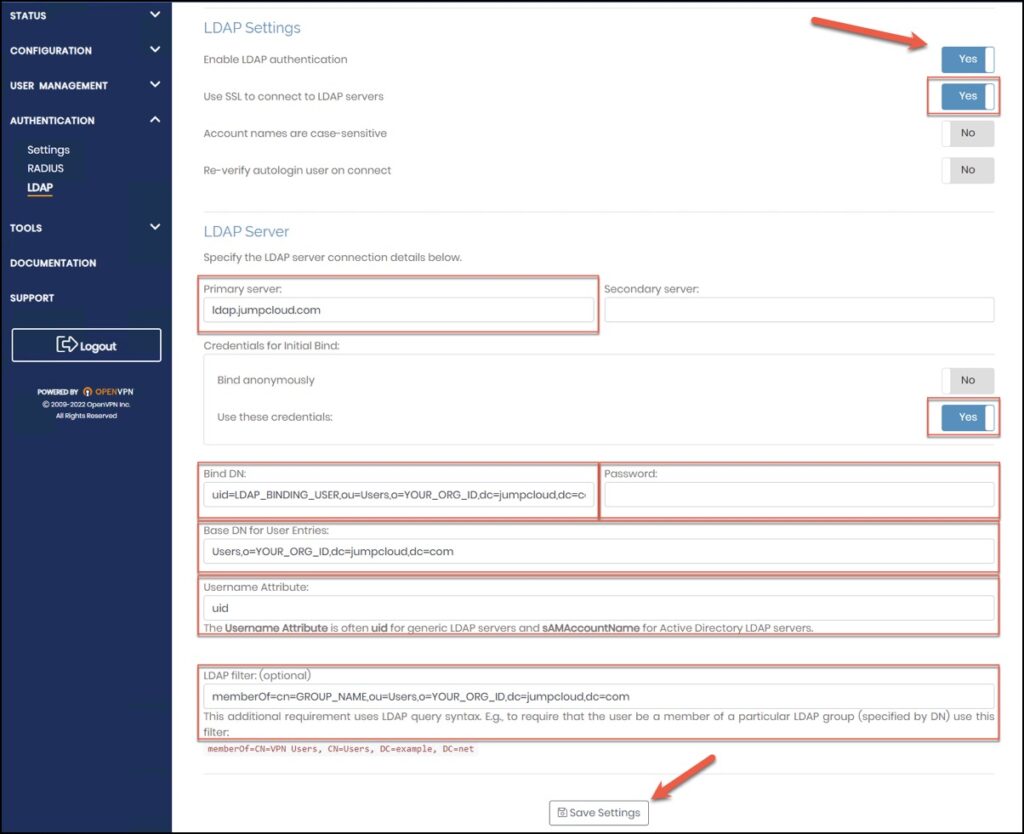
LDAP Settings:
- Primary server: ldap.jumpcloud.com
- Use SSL to connect to LDAP servers: On
- Credentials for Initial Bind: ‘Use these credentials’ select On
- Bind DN: uid=LDAP_BINDING_USER,ou=Users,o=YOUR_ORG_ID,dc=jumpcloud,dc=com
- Password: LDAP_BINDING_USER_PASSWORD
- **Username Attribute:**uid
- (Optional) Group Setting:
- You can add a requirement for LDAP group membership to control user access. To leverage LDAP Groups, see Create an LDAP Group.
- Additional LDAP Requirement: memberOf=cn=GROUP*_NAME*,ou=Users,o=YOUR_ORG_ID,dc=jumpcloud,dc=com
Testing OpenVPN Authentication and Authorization
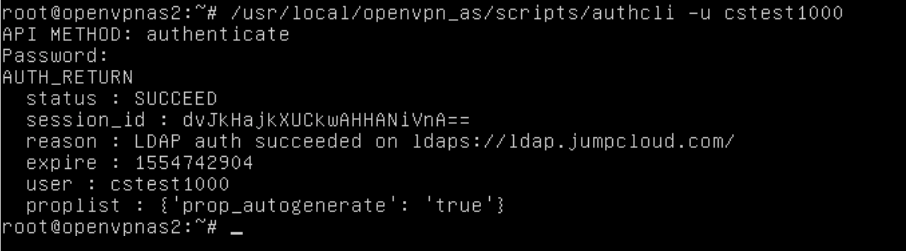
The OpenVPN Access Server provides a command line utility "authcli" that can be used to validate your JumpCloud Directory-as-a-Service authentication and authorization configuration.
PATH: /usr/local/openvpn_as/scripts/authcli
USAGE: authcli --user JumpCloud_Username
Troubleshooting OpenVPN Authentication and Authorization
For additional diagnostic information, you can enable Debug Level logging within the OpenVPN Access Server 'as.conf' configuration file, restart the service and review the verbose log messages within the default "/var/log/openvpnas.log" file.
$ sudo bash -c "echo "DEBUG_AUTH=true" >> /usr/local/openvpn_as/etc/as.conf
$ sudo service openvpnas restart
After you finish troubleshooting, edit the configuration file to comment out the DEBUG reference and restart the service to return to normal operation.
#DEBUG_AUTH=true
$ sudo service openvpnas restart
OpenVPN Documentation
Review the OpenVPN site for documentation on troubleshooting authentication and enabling debug level logging.
Was this information helpful?